Recipes

If you're stuck, try these!

Ready-made offers you can copy straight into Sam โ€” storewide sales, reward ladders, free-shipping thresholds and more. Each one has the exact settings and the wording to paste. Pick one, tweak the numbers, go live.

๐Ÿงฎ

Every recipe below maps to real fields in Sam Settings. Create a card, copy the settings and messages shown, adjust the amounts to suit your store, and save. New to Sam? Start with getting started first, then come back and build one of these.

๐Ÿ”ฅ The headline act

Storewide sales

Sam doesn't just reward big carts โ€” it can run a flat, instant sale across your whole store. Set a threshold of $0 and the offer fires the moment a visitor arrives, discount applied automatically. Perfect for Black Friday, end-of-financial-year, clearance and flash sales.

Storewide sale Free

The simple storewide sale

One flat discount across everything, live the instant someone lands on your store. The digital version of a big "20% OFF EVERYTHING" sign in the window. No spend required.

The settings

  1. Create a Base card
  2. Set Minimum cart value to 0
  3. Set Discount type to Percentage, and Discount % to 20 (or your number)
  4. In the Reward message, write your sale announcement (see below). Leave intro and teaser blank โ€” they don't show on a $0 sale
  5. Running it for a set period? Add Start / End dates and tick Show countdown timer for the "Ends inโ€ฆ" counter
  6. Save, and confirm the storewide-sale prompt

Copy this message

Reward message
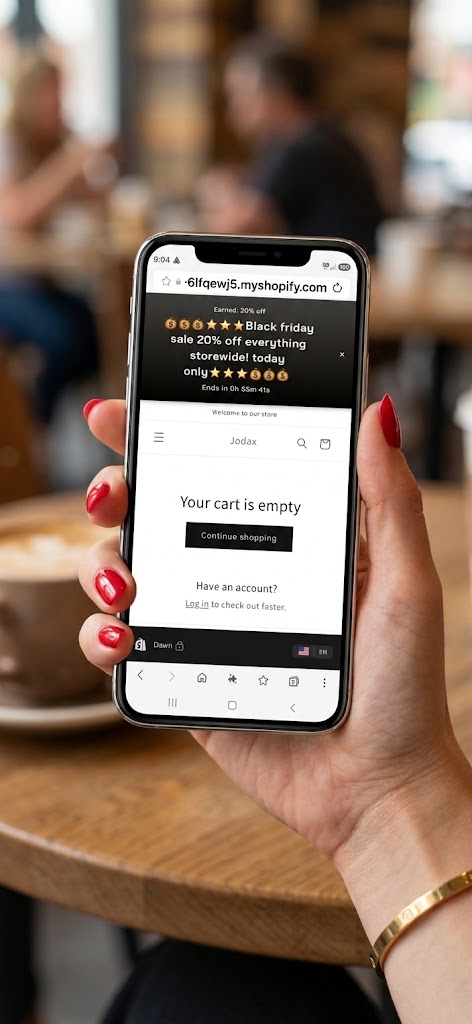
๐Ÿ’ฐ๐Ÿ’ฐ๐Ÿ’ฐโญโญโญ Black Friday sale 20% off everything storewide! today only โญโญโญ๐Ÿ’ฐ๐Ÿ’ฐ๐Ÿ’ฐ

Intro & teaser: leave blank.

Only % or free shipping. A $0 sale can use a percentage or free-shipping reward. Fixed-amount and free-gift rewards aren't allowed at $0 (they'd give value away to every visitor for nothing).

The result
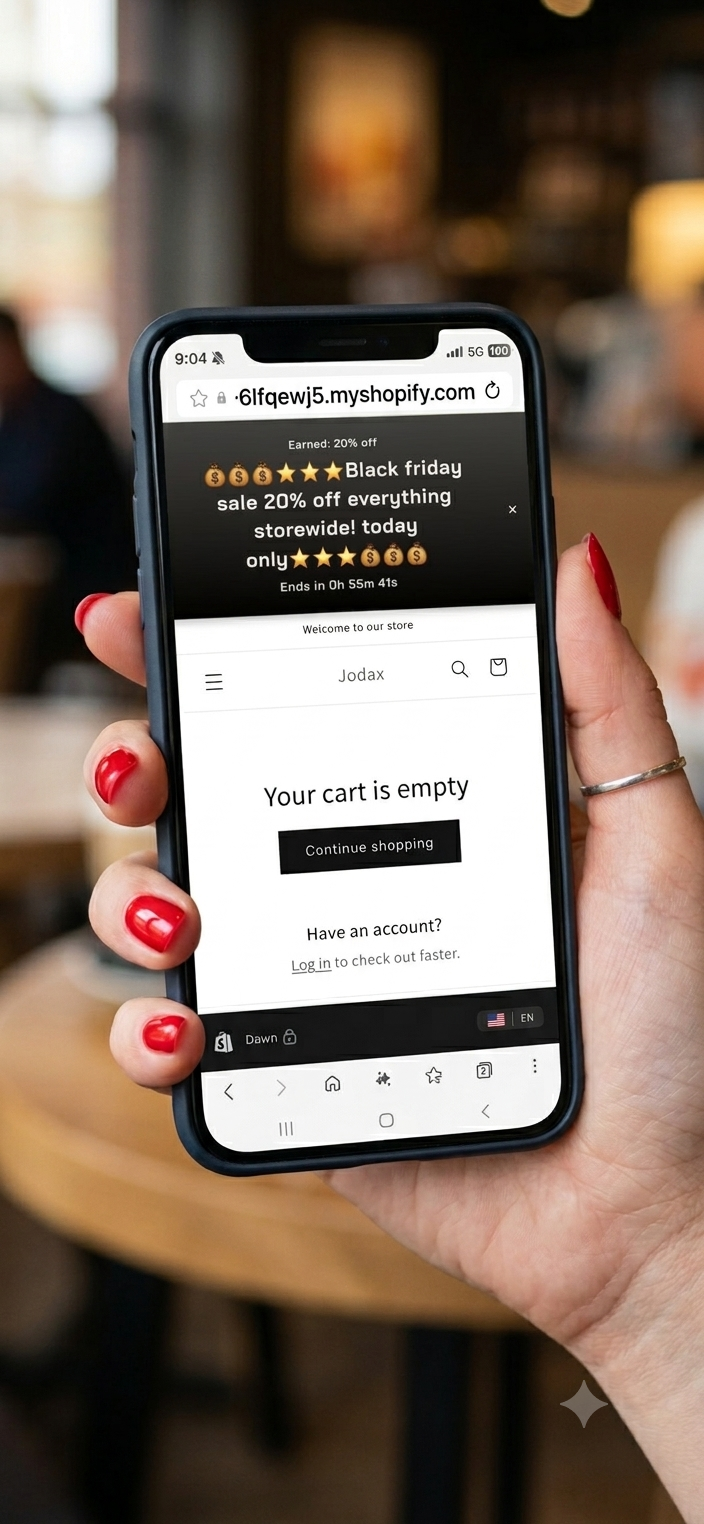
Black Friday storewide sale banner on mobile
Storewide sale Sam Gold

The country-specific sale

A storewide sale shown only where you want it. An Australian end-of-financial-year sale that greets shoppers in Australia, while everyone else sees your store as normal. Set one country or several.

The settings

  1. Build a storewide sale Base card โ€” threshold 0, Percentage 20
  2. In Countries, tick Australia (or several countries)
  3. Write your Reward message for that audience (see below)
  4. Add Start / End dates to run it for the sale period, and tick Show countdown timer for the "Ends inโ€ฆ" counter
  5. Save, and confirm the storewide-sale prompt

Copy this message

Reward message
๐Ÿ’ฐ It's our Australian end of financial year sale! 20% off everything storewide! today only ๐Ÿ’ฐ

Intro & teaser: leave blank.

One sale at a time. Sam runs one active ladder at a time, so you can't run a different country-locked sale in each market simultaneously. Set the countries you want on your one live sale. (This is by design โ€” it keeps which offer is showing unambiguous.)

The result
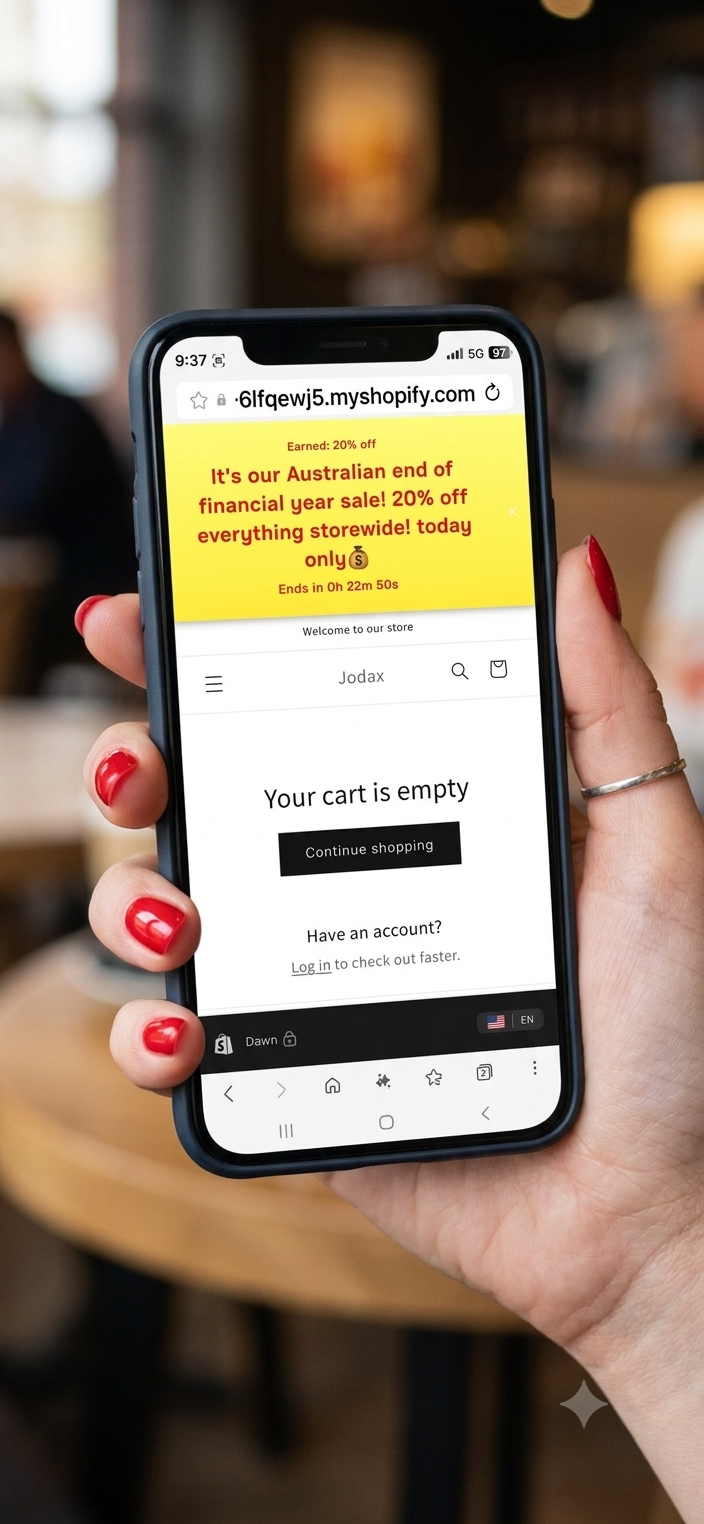
EOFY Australia storewide sale banner on mobile
๐Ÿชœ The upsell act

Climbing sales

A storewide sale that climbs. Start everyone on a flat discount, then stack a bigger reward higher up the ladder. Shoppers get the sale immediately โ€” and a reason to add more to their cart.

Storewide sale + ladder Sam Gold

The sale that climbs

Take your storewide sale base and add one tier on top. Everyone gets the 20% sale the moment they arrive โ€” then, as their cart grows, Sam teases a bigger 40% reward and unlocks it at $400. A sale and an upsell in a single ladder. This is the same Black Friday base from above, now with a tier added to show ladder-building.

The shopper's journey

Empty cart with 20% storewide sale banner
1
The sale greets them
Empty cart, the 20% storewide sale shows instantly.
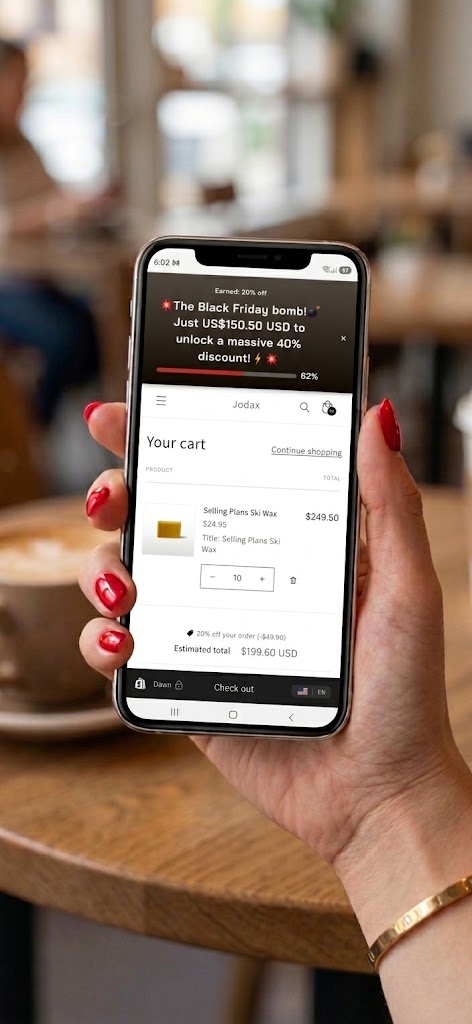
Cart with items, tier teaser and progress bar toward 40 percent
2
The climb
As the cart grows, Sam teases the 40% and shows how far to go.
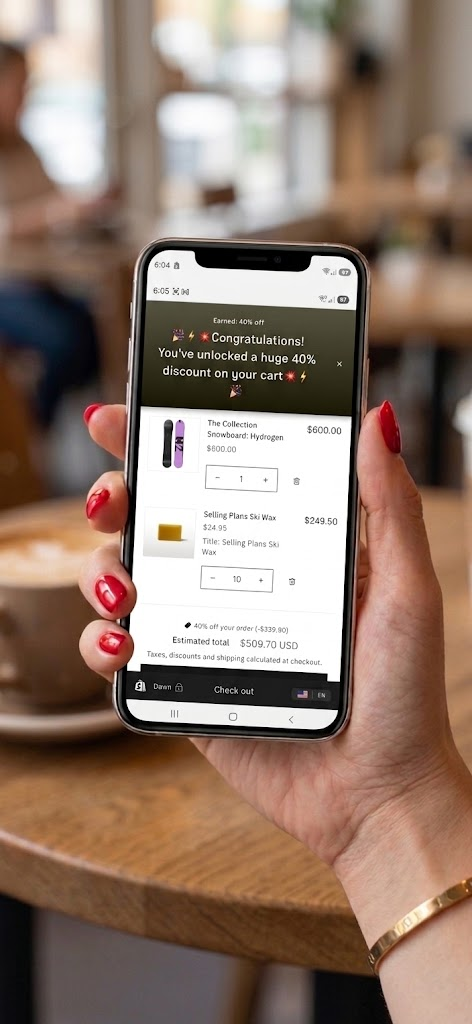
Bigger cart with 40 percent discount unlocked and applied
3
Unlocked!
Cart hits $400 โ€” the full 40% applies to everything.

Fill the cards out exactly like this

Card 1 The Base (the sale)
  • Card typeBase
  • Minimum cart value0
  • Discount typePercentage
  • Discount %20
  • Intro messageleave blank
  • Teaser messageleave blank
Reward message
๐Ÿ’ฐ๐Ÿ’ฐ๐Ÿ’ฐโญโญโญ Black Friday sale 20% off everything storewide! today only โญโญโญ๐Ÿ’ฐ๐Ÿ’ฐ๐Ÿ’ฐ
Card 2 The Tier (the climb)
  • Card typeTier
  • Attach to base(your base's name)
  • Minimum cart value400
  • Discount typePercentage
  • Discount %40
Teaser message
๐Ÿ”ฅโšก The Black Friday bomb! Just {remaining} to unlock a massive 40% discount! โšก๐Ÿ”ฅ
Reward message
๐ŸŽ‰ Congratulations! You've unlocked a huge 40% discount on your cart ๐Ÿ”ฅโšก
โš ๏ธ Watch your discount math

Be careful stacking a big tier discount on top of a sale. If the higher reward is too steep, a bigger cart can actually earn you less than a smaller one โ€” and in the worst case, discount you below cost.

Example: a $399 cart at 20% off = you collect $319. A $400 cart at 40% off = you collect $240. The shopper spent $1 more, but you earned $79 less on that sale. Always check the total still makes sense at the point the tier unlocks.

The classics

Reward ladders

The original Sam move: reward shoppers for spending more. These nudge cart totals up by showing shoppers exactly what the next rung unlocks.

Free Gold for extra tiers

The classic spend ladder

Sam's original move, and still the best cart-builder there is. Reward shoppers for spending more: hit $100 for 10% off, then keep climbing to $200 for 15%. Because this base has a real threshold (not a $0 sale), shoppers see the full journey โ€” a welcome intro, a live teaser as they climb, and the reward when they arrive.

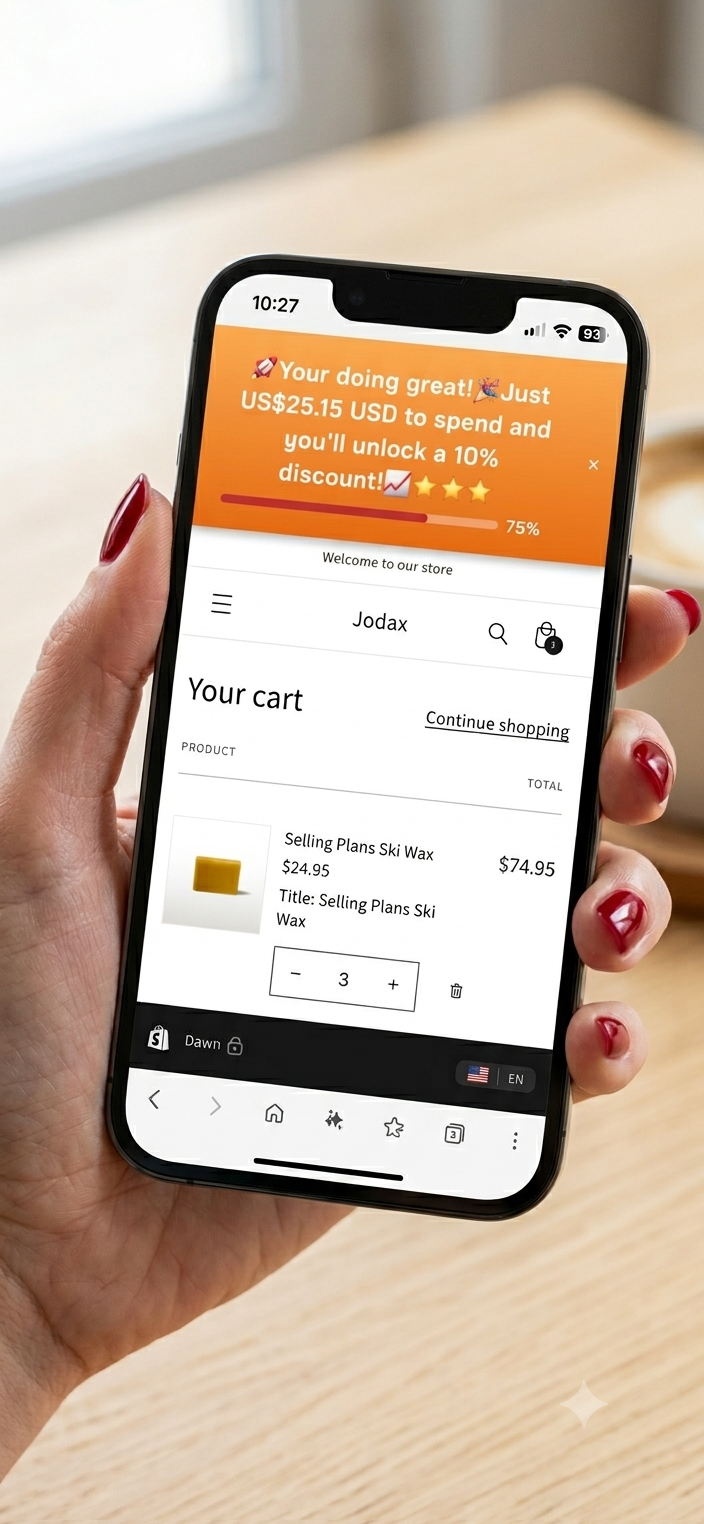
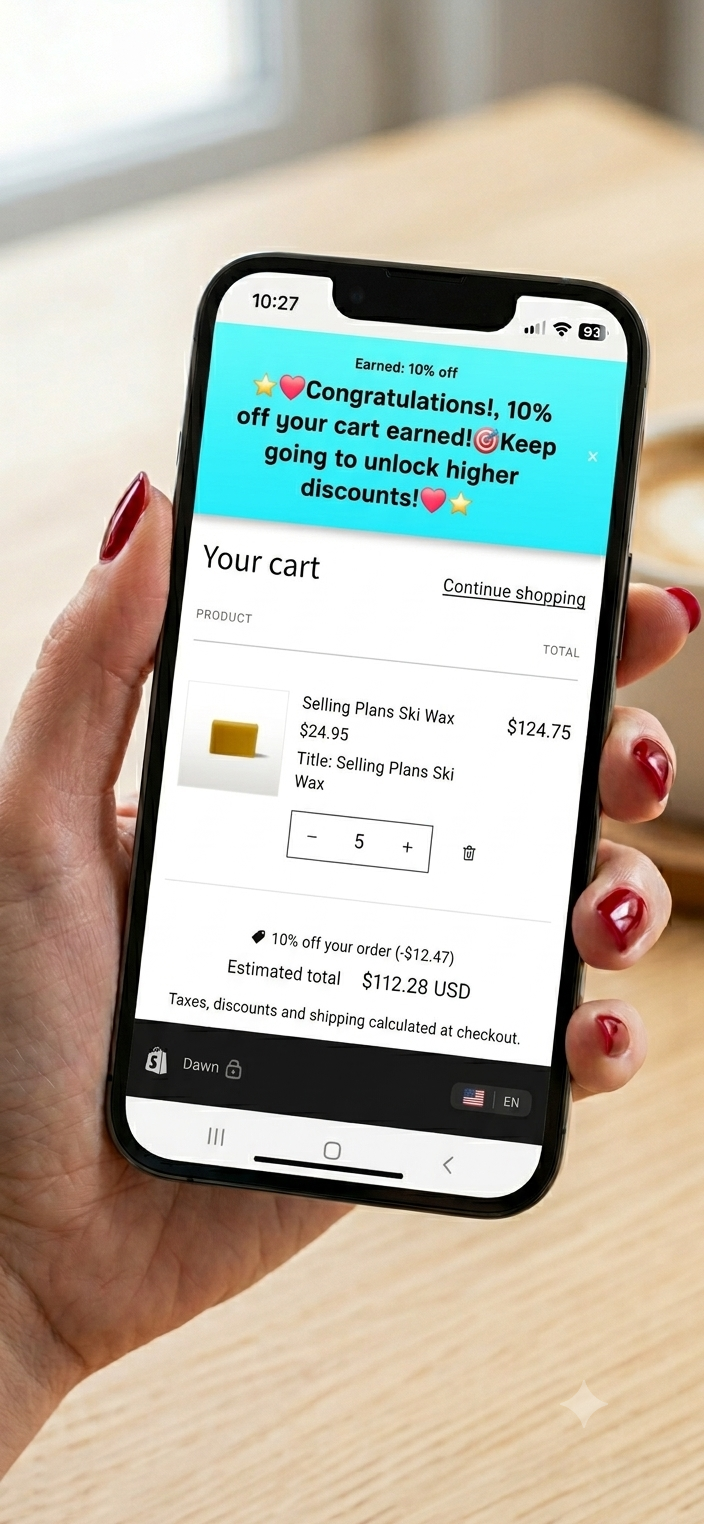
Card 1 ยท Base $100 โ†’ 10% off โ€” the shopper sees three states
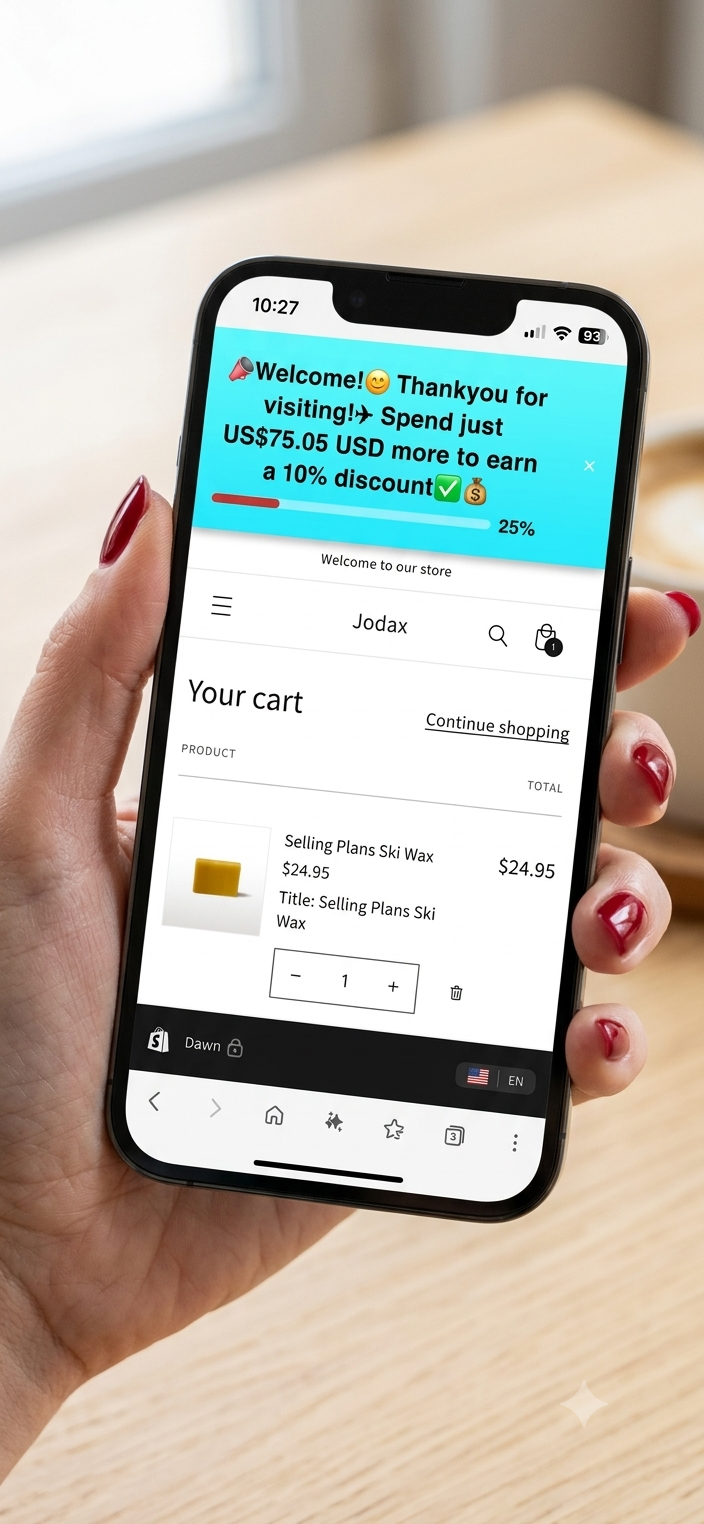
Ladder base intro: welcome message, spend to earn 10 percent
Intro
Greets the shopper once their first item's in
Ladder base teaser: almost there, spend a little more for 10 percent
Teaser
Climbing โ€” {remaining} to go
Ladder base reward: 10 percent earned, keep going for more
Reward
$100 hit โ€” 10% earned
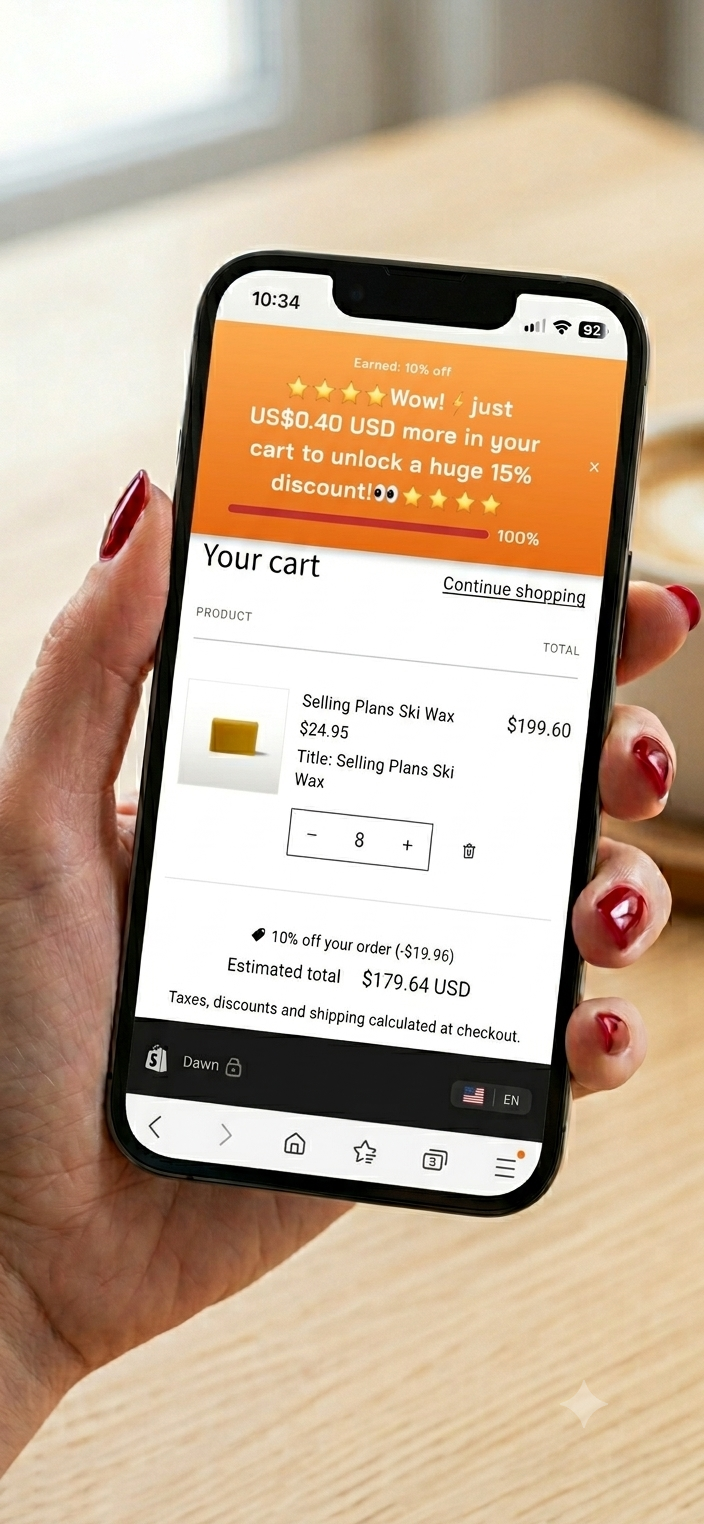
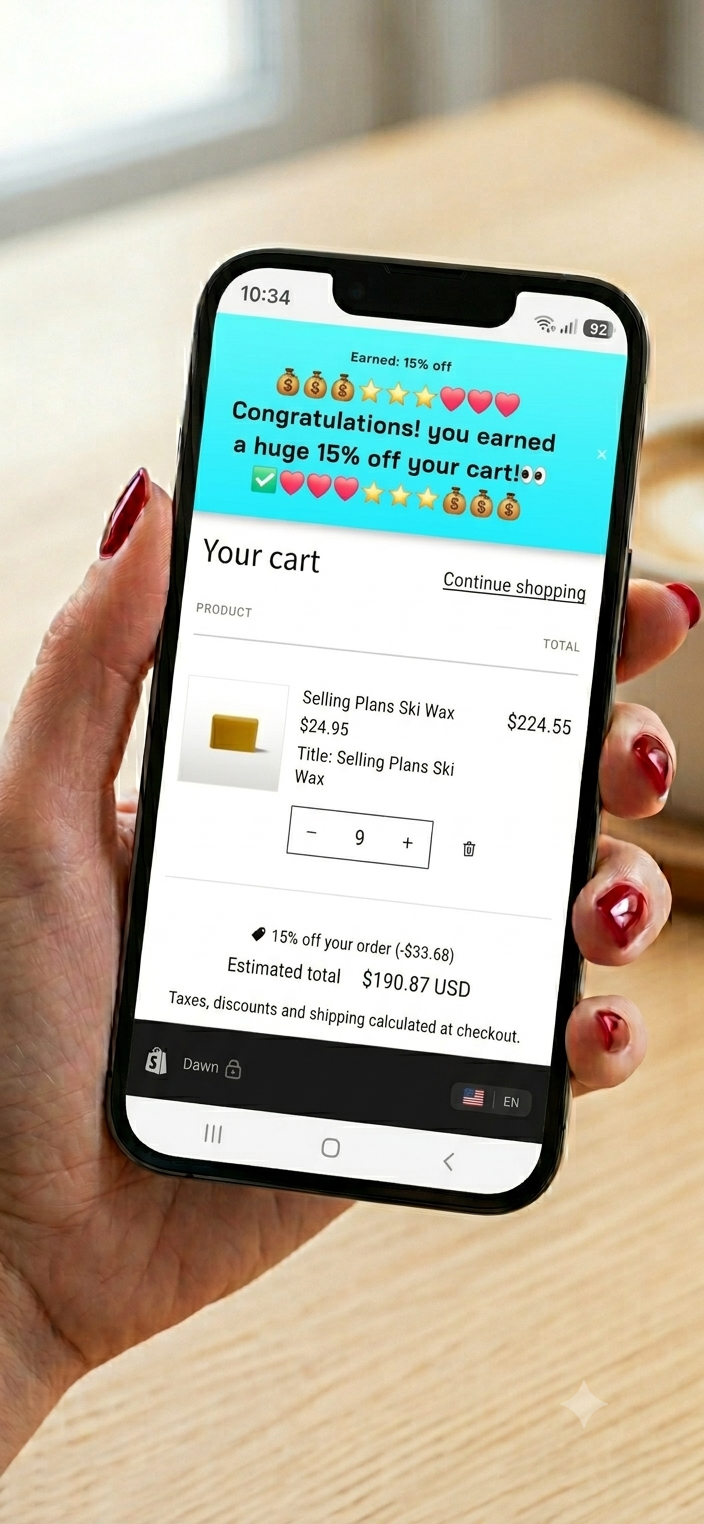
Card 2 ยท Tier $200 โ†’ 15% off โ€” teases the next rung, then pays off
Ladder tier teaser: spend a little more to unlock 15 percent
Teaser
Past $100 โ€” climbing to 15%
Ladder tier reward: 15 percent unlocked on the whole cart
Reward
$200 hit โ€” 15% earned

Fill the cards out exactly like this

Card 1 The Base
  • Card typeBase
  • Minimum cart value100
  • Discount typePercentage
  • Discount %10
Intro message
๐Ÿ‘‹๐Ÿ˜Š Welcome! Thankyou for visiting! Spend just {remaining} more to earn a 10% discount โœ…๐Ÿ’ฐ
Teaser message
๐ŸŽ‰ You're doing great! Just {remaining} to spend and you'll unlock a 10% discount! ๐Ÿ”ฅโญ
Reward message
๐Ÿ’– Congratulations! 10% off your cart earned! ๐ŸŽ‰ Keep going to unlock higher discounts! ๐Ÿ’–
Card 2 The Tier
  • Card typeTier
  • Attach to base(your base's name)
  • Minimum cart value200
  • Discount typePercentage
  • Discount %15
Teaser message
๐ŸŒŸ Wow! Just {remaining} more in your cart to unlock a huge 15% discount! ๐ŸŽ‰โญ
Reward message
๐ŸŽ‰๐Ÿ’– Congratulations! You earned a huge 15% off your cart! ๐Ÿ’–๐ŸŽ‰
This is the difference from a storewide sale: because the base threshold is $100 (not $0), the intro and teaser messages DO fire โ€” the shopper gets welcomed, nudged, then rewarded. On a $0 storewide sale, only the reward message shows.
Free

A fixed amount off

A flat dollar discount at a threshold โ€” "spend $100, get $10 off." Simple for shoppers to grasp, and it shows the full welcome โ†’ nudge โ†’ reward journey because the base has a real threshold. Just mind the pitfalls below: a fixed amount behaves very differently from a percentage.

The shopper's journey

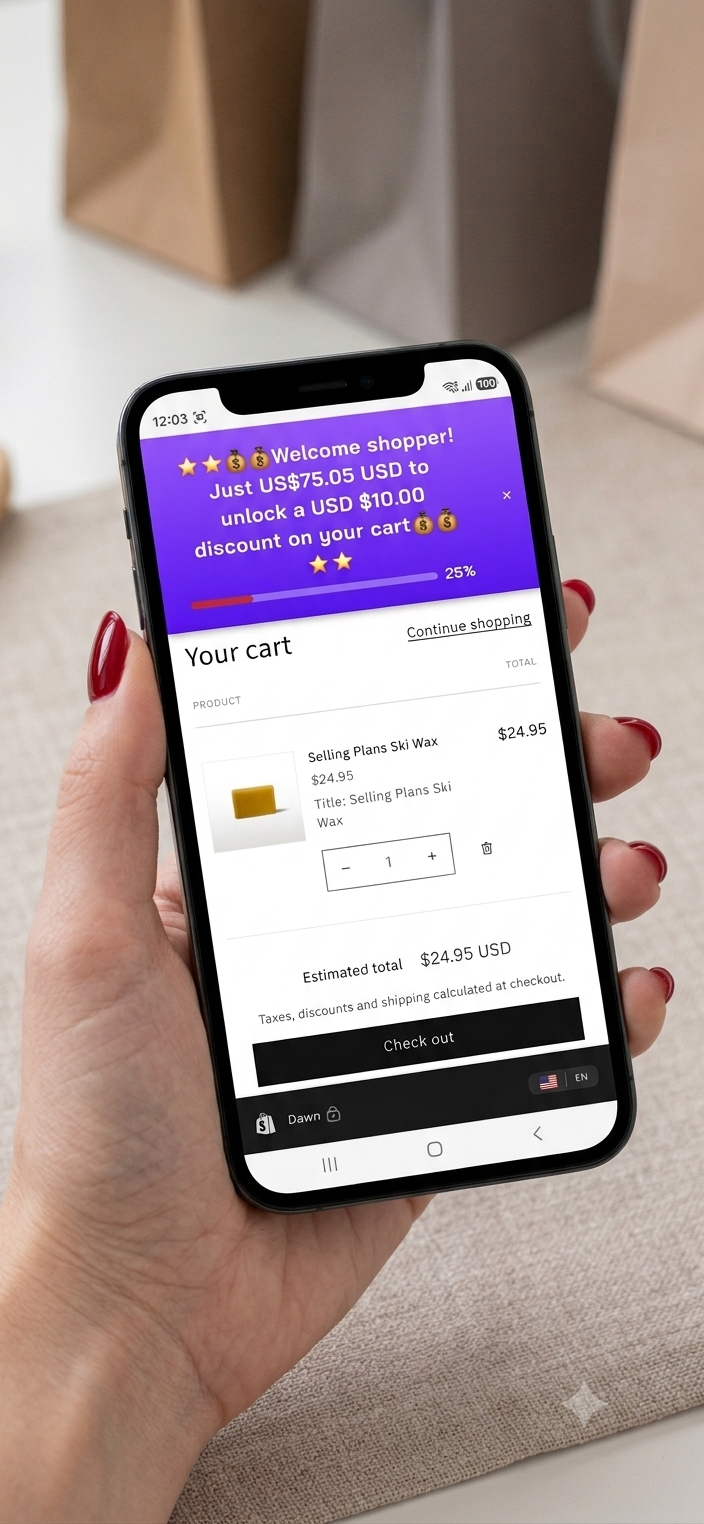
Fixed amount intro: welcome, spend to earn USD 10 off
1
Intro
Greets the shopper once their first item's in.
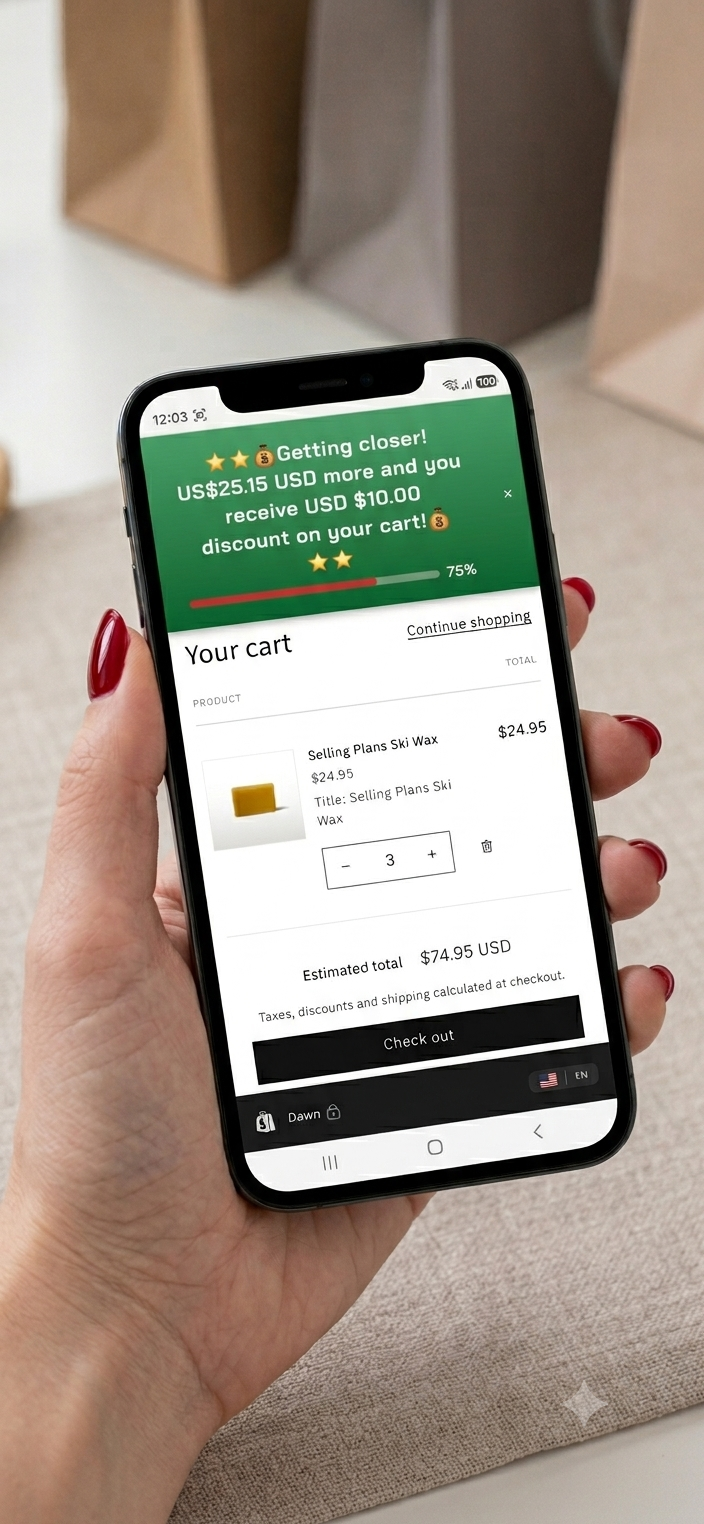
Fixed amount teaser: getting closer to USD 10 off
2
Teaser
Climbing โ€” {remaining} to go.
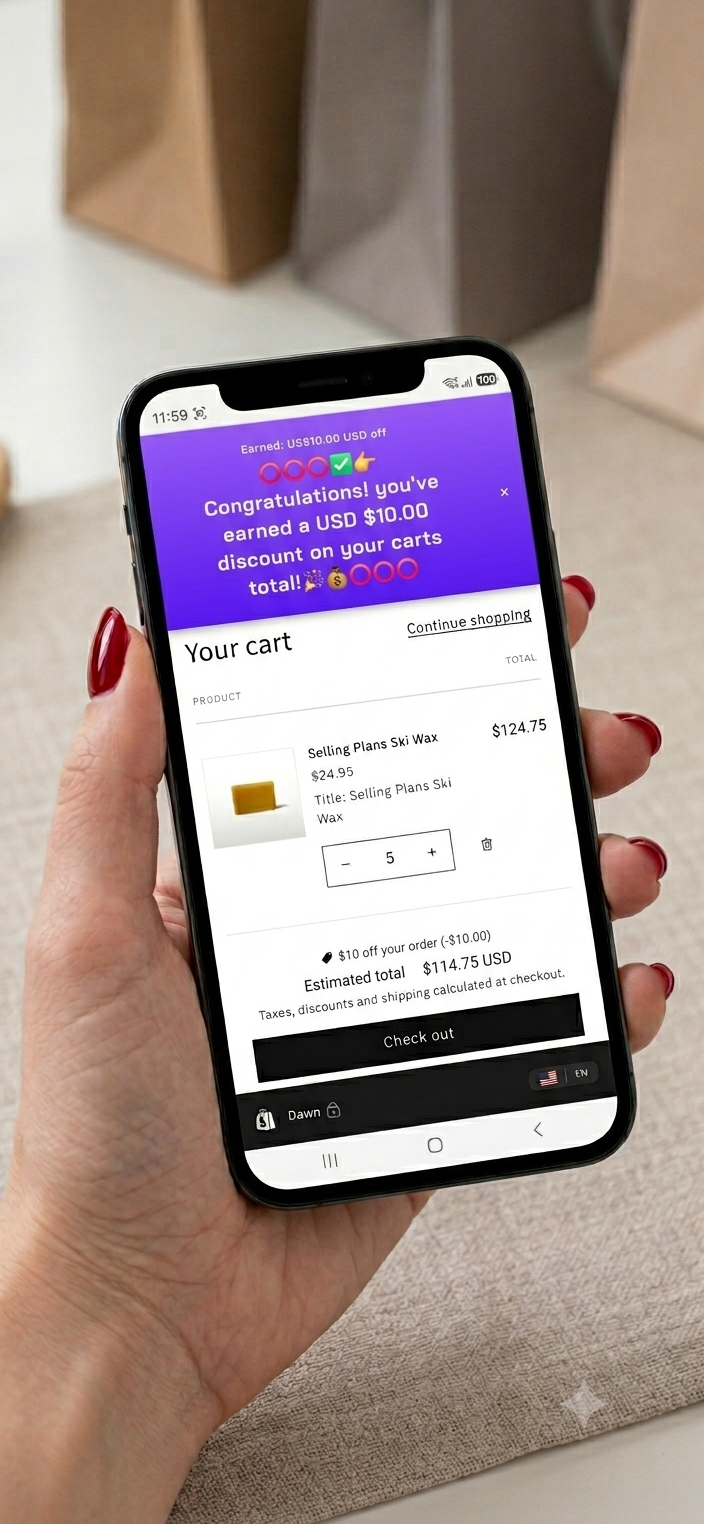
Fixed amount reward: USD 10 off earned
3
Reward
$100 hit โ€” USD $10 comes off.

Fill the card out exactly like this

Card 1 The Base (only card needed)
  • Card typeBase
  • Minimum cart value100
  • Discount typeFixed amount
  • Discount amount10.00
Intro message
๐Ÿ‘‹โญ Welcome shopper! Just {remaining} to unlock a USD $10.00 discount on your cart โญ
Teaser message
๐ŸŽ‰ Getting closer! {remaining} more and you receive USD $10.00 discount on your cart! โญ
Reward message
๐ŸŽ‰๐Ÿ’š Congratulations! You've earned a USD $10.00 discount on your cart's total! ๐ŸŽ‰
โš ๏ธ Fixed-amount pitfalls โ€” read these
  • 1. Always state your currency. Unlike a percentage, a fixed amount does not auto-convert. A shopper seeing "$10 off" abroad doesn't know if that's USD, AUD, CADโ€ฆ Write "USD $10.00" so it's unambiguous. Your {remaining} token still shows in their currency โ€” it's only the fixed reward figure you must label.
  • 2. Set the threshold high enough. $10 off a $100 cart is 10%. But $10 off a $30 cart is 33%. Keep the threshold well above the reward so you're not giving away too much on small carts.
  • 3. Not for storewide sales. A fixed amount can't be used on a $0 storewide sale (it'd hand cash to every visitor). Sam blocks that โ€” use percentage or free shipping for a $0 sale.
The delight move

The surprise thankyou

Not every reward needs a countdown. Set a threshold, leave the intro and teaser blank, and let a free gift plus free shipping simply appear at the finish line โ€” an unexpected thankyou that turns a good order into a great memory.

Sam Gold

Free gift + free shipping, no fanfare

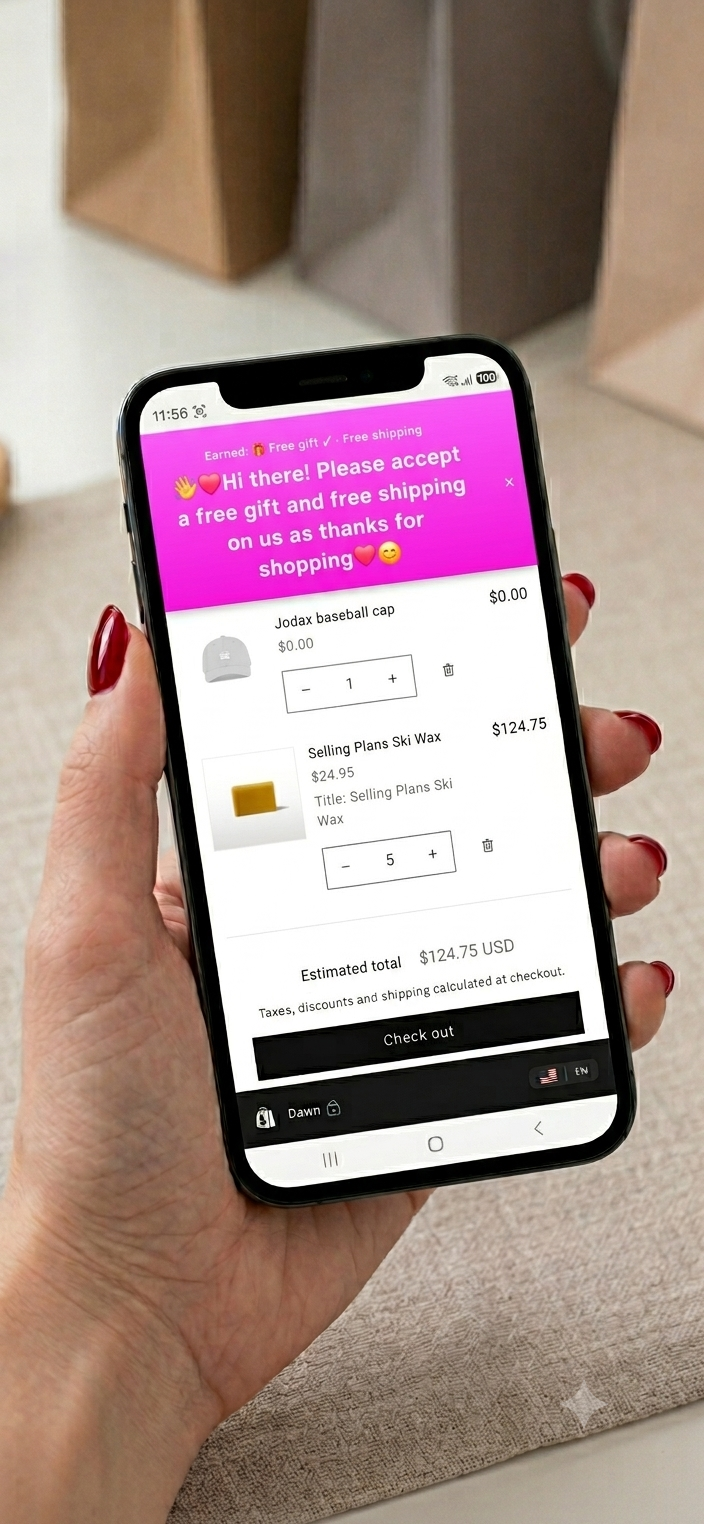
A single base card that stacks two rewards โ€” a free gift and free shipping โ€” with no intro or teaser. The shopper isn't chased toward it; they just cross the threshold and get a warm surprise. Because intro and teaser are left blank, only the thankyou shows.

The settings

  1. Create a Base card, Minimum cart value 100
  2. Turn on Free shipping as the reward
  3. Turn on Free gift and pick the product (set its price to $0.00, keep it unlisted so it's not sold separately)
  4. Leave Intro and Teaser blank โ€” this is a surprise
  5. Write only the Reward message (below)

Copy this message

Reward message
๐ŸŽ๐Ÿ’— Hi there! Please accept a free gift and free shipping on us as thanks for shopping ๐Ÿ˜Š

Intro & teaser: leave blank.

Two rewards, one card. A gift rides alongside any reward (here, free shipping) โ€” just remember the ladder allows only one gift. The gift product must exist in your catalog at $0.00; draft products can't be added to a cart.

The result

Surprise thankyou: free gift and free shipping at checkout
๐ŸŽ How to create your free gift product
  • 1. Make the product in Shopify. Go to Shopify admin โ†’ Products โ†’ Add product. Give it a name (e.g. "Free gift โ€” baseball cap") and an image, exactly like any other product.
  • 2. Price it $0.00. Set the price to zero so the shopper is charged nothing when it's added. This is what makes it "free."
  • 3. Set status to Unlisted. In the product's status, choose Unlisted (not Draft). Unlisted means the app can add it to the cart, but it won't show up in your storefront or search for shoppers to buy on its own. Draft won't work โ€” draft products can't be added to a cart.
  • 4. Give it some stock. Add inventory (even a large number) so Sam can add it to carts โ€” a $0 item with zero stock still can't be added.
  • 5. Attach it in Sam. Back on your card, turn on Free gift and pick your $0.00 product from the list. Save โ€” done.
More classic moves

Other reward ideas

The same ladder mechanics, aimed at different goals. Here's the shape of each.

๐Ÿšš

Free shipping threshold

The single most effective cart-builder. "Spend a little more, ship it free." One base card, free-shipping reward, threshold set just above your average order value.

Base card ยท threshold e.g. 75 ยท reward Free shipping ยท teaser "Add {remaining} for free shipping!"

๐ŸŒ

Region-only promotion

Sam Gold. Run an offer in just one market. Target specific countries so a promotion shows only where you want it, without touching the rest of your store.

Any ladder + Countries allowlist on the base card

๐Ÿงฎ Sam Gold

The Ladder Golden Rules

The full logic of how ladders work, laid out plainly. Keep these in mind and your offers will always behave.

  • One ladder runs at a time. You can build a whole library of ladders, but only one is ever live โ€” this keeps which offer is showing unambiguous.
  • Base cards hold the settings. Only a Base card sets the ladder's name, dates, countries, and pause. It's the foundation everything else attaches to.
  • Tier cards attach to a Base. When you create a Tier, you pick its Base by name to join that ladder. A Tier can't exist on its own.
  • Tiers inherit dates & countries. Tier cards can't set their own schedule or country targeting โ€” they follow whatever their Base is set to.
  • Tiers can be moved. Edit a Tier and select a different Base name to move it onto another ladder.
  • The Base is the lowest rung. The Base always has the lowest threshold; every Tier must be higher.
  • Rewards climb with spend. A higher rung can't give a smaller reward than a lower one โ€” the ladder only ever goes up.
  • One discount type per ladder. All percentage, or all fixed, or all free shipping โ€” not mixed. (A free gift can be added on top, as long as there's only one gift in the whole ladder.)
  • A $0 Base is a storewide sale. Set the Base threshold to $0 and it fires instantly for every visitor. At $0, only percentage or free-shipping rewards are allowed.
  • Word your banners with {remaining}, not fixed amounts. Typing {remaining} in a message shows the exact amount left to reach the reward โ€” and it displays in each shopper's own currency automatically, so it's always right. Your store may be viewed in different countries and currencies, so if you must write an actual amount, always state your store's currency: "Just {remaining} to win $10 USD off your cart!"
  • Free vs Sam Gold. Free runs one always-active ladder (up to 4 cards). Sam Gold lets you build multiple ladders (up to 20 cards) and schedule them โ€” one always-active, plus dated ladders in their own windows โ€” and unlocks country targeting, free gifts and countdowns. Only one ladder is ever live at a moment.

Found one you like?

Build it in a couple of minutes. Every field above lives in Sam Settings.